Monday, November 2, 2020

Maruti Suzuki Sold More Cars In Oct 2020 Than Hyundai, Tata, Kia Combined

Undoubtedly Maruti Suzuki is the biggest automaker in India. For October 2020, Maruti Suzuki alone sold more cars than Hyundai, Tata Motors, Kia, Mahindra, Toyota, Honda, and many other automakers combined. There are several international automakers in India, yet Maruti Suzuki is way ahead of all of them in terms of sales.

The automaker managed to sell 163,656 units with an increment of 17.6% in sales compared to 2019. The numbers are quite surprising as there has been a financial crisis this year. However, this is a festive season, and Diwali, the biggest festival in India, is approaching. Still, this sales record is beyond our expectations and is worthy of appreciation.

Not only this but, Hyundai, which is the second-largest automaker, reported its highest ever domestic sales for October 2020. Hyundai sold over 56,000 units in the domestic market. In fact, the majority of automakers have reported growth in sales compared to last year.

Maruti Suzuki Sold The Most Number Of Cars

Here’s a table showing the sales figures of some automakers for the month of October of both 2019 and 2020.

Automakers October 2019 October 2020 Growth % (YoY)
Maruti Suzuki 139,121 163,656 17.6
Hyundai 50,010 56,605 13.19
Tata Motors 13,169 23,600 79.21
Kia Motors 12,854 21,021 63.54
Mahindra 18,460 18,622 0.88
Toyota 11,866 12,373 4.27
Renault 11,516 11,005 -4.44
Honda 10,010 10,0836 8.25
Ford 7,017 7,084 0.95

Tata Motors: An Old Giant Restoring Itself

Tata Motors sale october 2020
Image: Tata Motors

As you can see, most of the companies saw a spike in their sales. Tata Motors and Kia Motors are the two automakers with the most exponential chart. It’s also the best sales figure for Tata Motors for October since 2012. It seems like the idea of providing low budget safe cars is finally working for Tata Motors.

Over the past few years, Tata has completely replaced its passenger vehicle line-up. The Indian automaker has focused on one of the most important aspects of vehicles, i.e., safety. At present Tata has the highest number of cars with a four and five-star safety rating in global NCAP crash tests.

Also Read: Here Are The Safest Cars In India Under 10 Lakhs.

Tata Motors has also strengthened the technology, design, and service network of its cars. Its Tata Nexon EV is the best selling electric car in India. In short, the Indian automaker has shown some dedication in its work, and now it’s paying back.

Kia Motors: An Emerging Automaker

Kia Motors India sales oct 2020
Image: Kia Motors

Though Kia is a reputed global automaker, it’s still impressive to see how it attracted customers within a couple of years. Many internationally renowned brands have failed to achieve that. For Kia Motors, most of the credit for this rise in sales goes to its newest launch, the Kia Sonet. It’s a compact SUV and basically a rival to Tata Nexon, Hyundai Venue, Maruti Brezza, and the like.

However, its elder sibling Kia Seltos is equally responsible as well. Both these cars compete in one of the most demanding segments in India. Currently, Kia has three cars in its portfolio: Kia Seltos, Carnival, and Sonet. We hope that Kia will continue to grow in the future.

Are People Buying More Cars This Year?

There is no need to explain the chronology of this year. During the lockdown, none of the cars were sold in the country. The experts predicted the automotive sector will pretty much remain the same. However, the sales are much better than the previous year.

Is it because the people who were planning to buy during the lockdown are buying now? Or is it only due to the festive seasons?

It might also be due to the new launches like Tata Altroz and Kia Sonet we had this year.

What do you guys think? Do share your views in the comments section below?

The post Maruti Suzuki Sold More Cars In Oct 2020 Than Hyundai, Tata, Kia Combined appeared first on Fossbytes.


from Fossbytes https://ift.tt/34T8GBb
via IFTTT

WhatsApp Disappearing Messages Coming Soon: Everything Explained

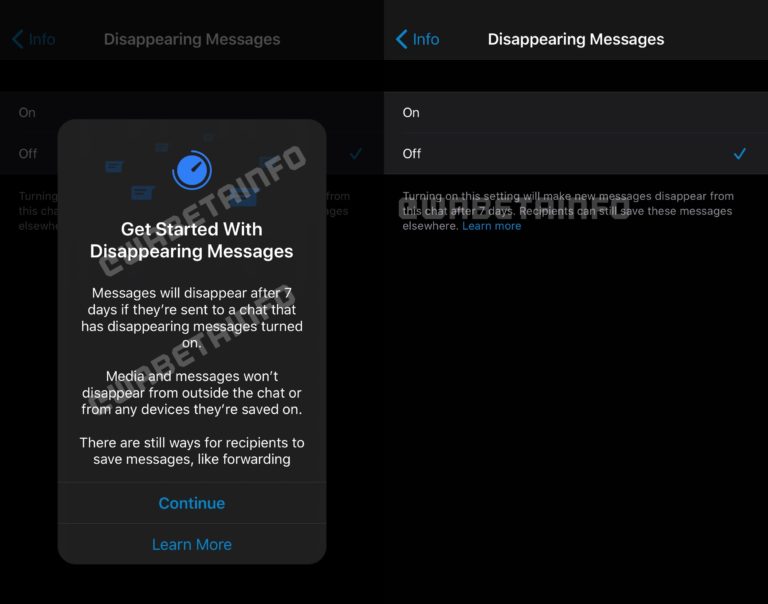
After Facebook Messenger, WhatsApp will also introduce disappearing messages. When enabled, the messages you share in a conversation will automatically get deleted after seven days.

The feature appeared on WhatsApp FAQs, revealing its working and how to toggle it on and off on various platforms; WABetainfo spotted the article. It is expected to roll out for users across different platforms soon so keep an eye out for the next WhatsApp update.

What You Need To Know

A screenshot from the upcoming WhatsApp disappering messages. Image- WABetainfo

WhatsApp is largely popular because of its strong end-to-end encryption. Messenger has been steadily improving with new features like the Always Mute option for contacts and groups. “Join Missed Calls” and Biometric Lock are two more features that may come in the near future.

There are certain details you need to know before you start using the disappearing messages feature on WhatsApp. The platform’s FAQ section tells some important details which are as follows:

  • If a user doesn’t open WhatsApp in the seven day period, the message will disappear. However, preview of the message might still be displayed in notifications until WhatsApp is opened.
  • When you reply to a message, the initial message is quoted. If you reply to a disappearing message, the quoted text might remain in the chat after seven days.
  • If a disappearing message is forwarded to a chat with disappearing messages off, the message won’t disappear in the forwarded chat.
  • If a user creates a backup before a message disappears, the disappearing message will be included in the backup. Disappearing messages will be deleted when a user restores a backup.

You should use disappearing messages only with trusted individuals and groups because the recipient can still take screenshots, forward, or copy disappearing messages before they disappear. Also, if you share a photo, video, or document using disappearing messages, it’ll get deleted from the chat window; if the receiver has auto-download turned on, it’ll be saved to their device.

In a nutshell, WhatsApp’s disappearing messages are good if you want to avoid clutter. However, it’s not a foolproof solution for sharing secrets over the instant messaging platform.

How To Toggle Disappearing Messages on WhatsApp?

The feature hasn’t rolled out yet but its presence on the FAQ section of the platform means it’ll be out soon. There are tutorials on how to turn on disappearing messages on WhatsApp.

For Android, iOS, and Web/desktop apps, open a WhatsApp chat, tap on contact name > disappearing messages. Tap on ‘Continue‘ if prompted, select on. You can follow the same procedure to turn it off.

If you’re on KaiOS, open a WhatsApp chat, go to Options > View contact > OK. Tap on Disappearing Messages > EDIT. If prompted, click on Next > OK, select On > OK.

Source: WhatsApp FAQs.

Via: WABetainfo

The post WhatsApp Disappearing Messages Coming Soon: Everything Explained appeared first on Fossbytes.


from Fossbytes https://ift.tt/37ZUFU4
via IFTTT

Huawei To Build A Shanghai Plant Amid Harsh US Sanctions

Following US sanctions, China-based Huawei has increasingly looked to source essential technology from fellow Chinese companies. In a related move, the smartphone maker now plans to build its own chip-manufacturing plant in Shanghai, China.

The Shanghai plant will manufacture low-end 45nm chips at the onset, and then expand operations to include 28nm chips (used for IoT) by 2021. Huawei aims to start building 20nm chips, used in 5G equipment, near the end of 2022.

For those who don’t know, smartphone giant Huawei has been at loggerheads with the US Government for quite some time. It all started, back in 2019, when Trump‘s administration put a ban on the Chinese company for allegedly spying on American soil.

Ever since then, the US has added to a growing list of sanctions on Huawei, making it harder to source integral technology produced by American firms. The most recent sanction, in May 2020, limited the supply of semiconductor chips to the Chinese tech giant.

Reacting to these sanctions, over time, Huawei has invested in China-based companies that manufacture chips and other essential technology. Just last year, it also opened an investment body to handle its shares in Chinese tech firms. As reported by The Strait Times, Huawei has completed 17 deals involving shares since then.

For the Shanghai project, Huawei has addressed its inexperience in chip-making by partnering with government-backed Shanghai IC R&D Centre. The synchronization between them would prove crucial to Huawei’s future as it tries to reduce its dependency on the US.

Moreover, the plant’s success would bolster China’s position as a potential chip-manufacturing force. The Chinese Government aims to boost production from 25% to 70% in the next five years.

The post Huawei To Build A Shanghai Plant Amid Harsh US Sanctions appeared first on Fossbytes.


from Fossbytes https://ift.tt/324pmns
via IFTTT

Why COD Mobile Players Are Angry At Developers After Season 11 Update

Last month, Call of Duty Mobile released the biggest and the most-awaited Season 11 update. Players were excited about the update because it also celebrated the first anniversary of the game.

However, ever since the Season 11 update went live, COD Mobile players have come across several in-game glitches. The constant frame drops, desync issues, and lag is making the game unplayable. This is why Call of Duty Mobile players are angry at the developers.

Call of Duty Mobile Season 11 update introduced a lot of amazing content. For instance, the fan-favorite ‘Alcatraz‘ map is finally available in COD Mobile. Other than that, there are new Multiplayers maps in COD Mobile Season 11 along with ‘The Club,’ a place for the players to hangout.

In terms of content, Call of Duty Mobile Season 11 is definitely amazing. However, players can’t enjoy the new content if the game isn’t running smoothly. Several COD Mobile have come forward on Twitter to report numerous irritating bugs, lag, and desync issues, both in Battle royale and Multiplayer.

Now, COD Mobile fanatics want developers to fix the game; thus, the hashtags “#FixCODM” and “FixOurGame” are trending on Twitter.

The players want developers to minimize the amount of new content and focus more on optimizing COD Mobile. Even iFerg, the popular Call of Duty Mobile YouTuber, urged developers to fix the game.

According to players, the problem started when Activision announced Sony’s Xperia as the official smartphone for Call of Duty Mobile. Ever since then, the developers are focused on optimizing the game exclusively for one device. That is why even high-end devices by brands other than Sony can’t run COD Mobile properly after the Season 11 update.

The post Why COD Mobile Players Are Angry At Developers After Season 11 Update appeared first on Fossbytes.


from Fossbytes https://ift.tt/380YN66
via IFTTT

How to Install Microsoft Windows Calculator on Linux

Have you heard about the Uno Platform? No, not the digital version of the popular card game. The first and only UI platform for creating Windows, Linux, WebAssembly, iOS, macOS, and Android applications from a single codebase. The Uno Platform took the source code for the recently open-sourced default Calculator app on Windows and ported […]

The post How to Install Microsoft Windows Calculator on Linux first appeared on FOSSMint: Everything About Linux and FOSS.


from FOSSMint: Everything About Linux and FOSS https://ift.tt/325iuWD
via IFTTT

Linux Mint Announces New Hypnotix IPTV Player And Chromium Package

We’re now only one and a half months (mid-December) away from the release of the first point version 20.1 of the Linux Mint 20 series, which recently received the codename “Ulyssa.”

Until you wait for Linux Mint 20.1 “Ulyssa,” its founder Clement Lefebvre has shared interesting updates on the latest monthly newsletter, which you can try right now.

Official Chromium Package

Chromium on Linux Mint 20

The first one is for those who don’t want to install the open-source web browser Chromium from Ubuntu Snap Store on Mint 20, where Snap is already blocked by default.

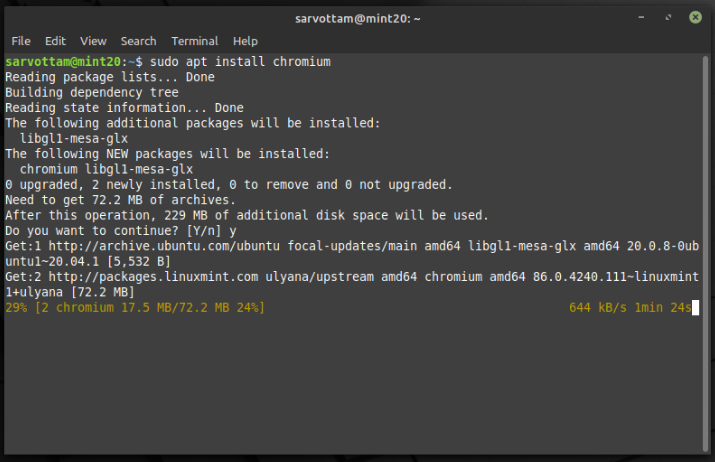
As announced in the last newsletter, the Mint team has started to package Chromium and make it available from the official repositories of Linux Mint. Hence, if you now want to install Chromium on Linux Mint 20.x and Linux Mint Debian Edition (LMDE) 4, run the following command:

sudo apt install chromium
Install Chromium on Linux Mint

Hypnotix IPTV Player

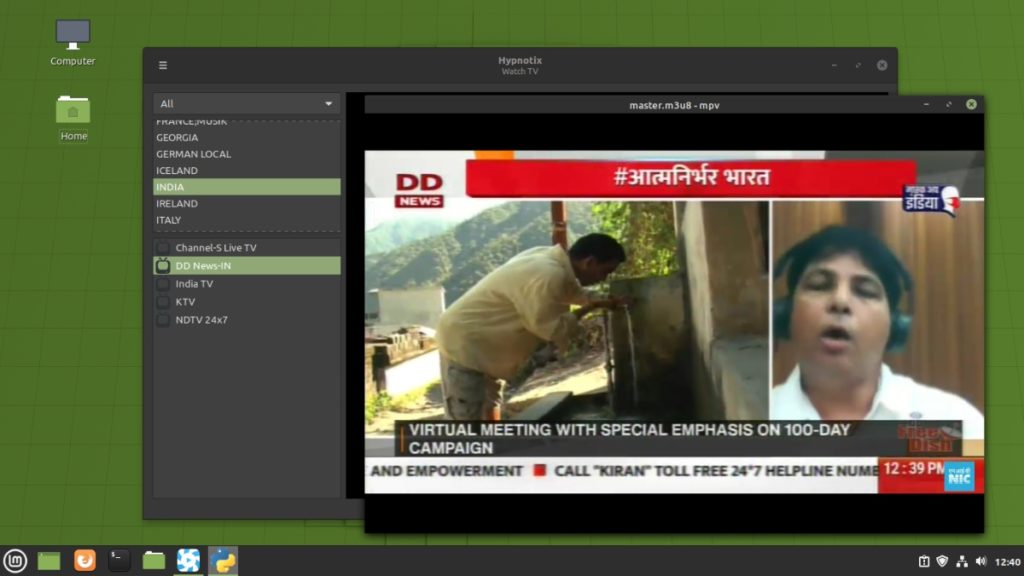
Hypnotix IPTV player

Another interesting update is the beginning of another new project (after WebApp Manager) called Hynotix, an M3U IPTV player. After receiving very positive feedback and interest in IPTV on Linux, the team has built a prototype of Hypnotix.

The Debian package for the Hypnotix prototype is available to download and install. By default, Hypnotix is configured with a free content provider (FreeIPTV), which provides streams for a variety of TV stations.

Additionally, you can also configure it with your own IPTV content provider by providing its name and your M3U address from the command line:

gsettings set org.x.hypnotix providers "['Provider_Name:::https://m3u_url.m3u']"

However, the project is still in the alpha stage with no translations and a very minimal user interface and set of features. Well, it’s not yet clear whether Hypnotix will be part of Linux Mint or not.

The post Linux Mint Announces New Hypnotix IPTV Player And Chromium Package appeared first on Fossbytes.


from Fossbytes https://ift.tt/324mLKd
via IFTTT

Linux Lite 5.2 Released: Here’s What’s New

On September 22, we reported that the first release candidate of Linux Lite 5.2 is available for downloading and testing. Creator of Linux Lite Jerry Bezencon, on October 31, released the final version of Linux Lite 5.2, which is now available to download. “This is the most feature-rich, complete Linux Lite release to date. This is the release many people have been waiting for,” he added.

Linux Lite 5.2 is based on the Ubuntu 20.04.1 LTS and Linux Kernel 5.4. What makes this distro special is its ability to run on ancient hardware. It ships with a customized Xfce desktop environment.

Also Read: Best Lightweight Linux Distributions For Old Computers

Linux Lite 5.2: What’s New?

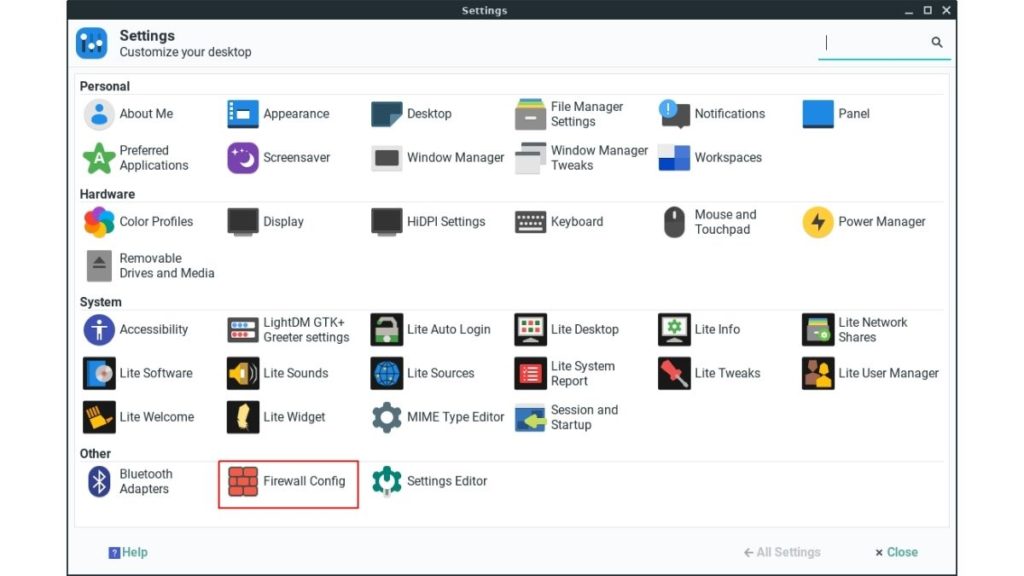
1. Users can now manage the Firewall from settings.

Linux Lite Firewall Config - Linux Lite 5.2 released

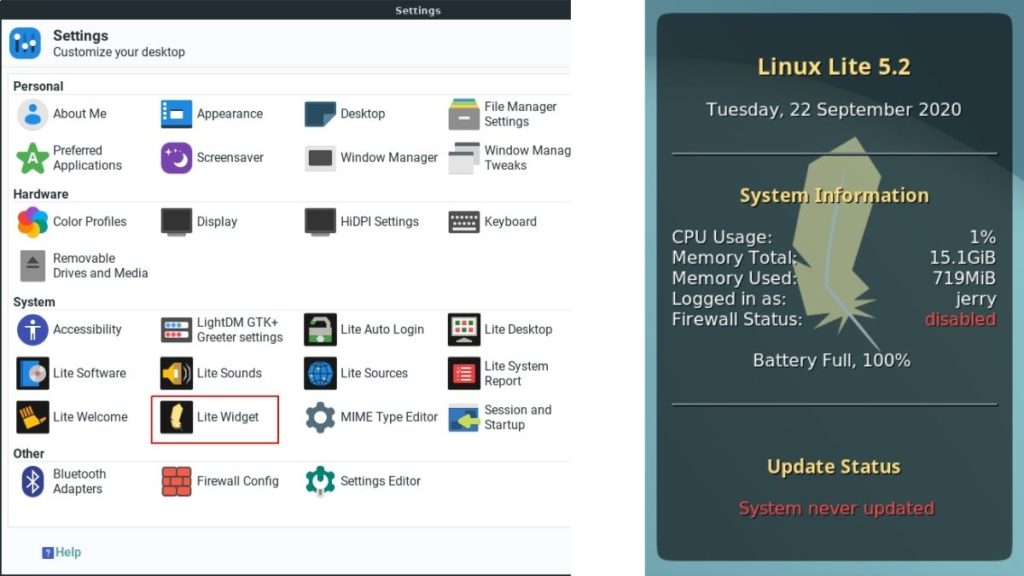
2. Users can now add a “Lite Widget” from the all in one settings manager app. For starters, the Lite Widget shows system stats like System Information and the Battery level.

Linux Lite Widget- Linux Lite 5.2 released

3. Grub menu image is now more transparent with more colors resulting in clearer boot screens while dual-booting.

Linux Lite Grub on Dual-boot

4. New Screensavers, 9 new Wallpapers, and apps like Zoom, Microsoft Teams, and SimpleScreenRecorder have also been added to Lite Software.

5. Support for Adobe Flash and deprecated GTK2 software and themes removed to reduce bloat.

6. Adapta is now the default window theme with Paparius as the new icon set, and Google’s Roboto as the default font of the interface.

You can download the ISO from the Official Website’s download page. Here are the minimum recommended specifications requirements.

  • CPU: 1GHz Processor
  • RAM: 768MB
  • Free Disk Space: 8GB or above
  • I/O Ports: A USB port or DVD drive to flash the ISO image

What do you think about this release? Do you know of or have you used any better distro for old computers other than Linux Lite? Let us know in the comments section below.

The post Linux Lite 5.2 Released: Here’s What’s New appeared first on Fossbytes.


from Fossbytes https://ift.tt/380OaQK
via IFTTT

Playing Grand Theft Auto Inside A Neural Network’s Hallucination? It’s Possible!

Ever imagined what a Neural Network's hallucination would look like? The post Playing Grand Theft Auto Inside A Neural Network’s Halluc...