Thursday, October 1, 2020

How to Free Up Space in /boot Partition on Ubuntu Linux?

The other day, I got a warning that boot partition is almost full or has no space left. Yes, I have a separate boot partition, not many people do that these days, I believe.

This was the first time I saw such an error and it left me confused. Now, there are several ways to free up space on Ubuntu (or Ubuntu-based distros) but not all of them are useful in this case.

This is why I decided to write about the steps I followed to free some space in the /boot partition.

Free up space in /boot partition on Ubuntu (if your boot partition is running out of space)

Free Boot Space Ubuntu Linux

I’d advise you to carefully read through the solutions and follow the one best suited for your situation. It’s easy but you need to be cautious about performing some of these on your production systems.

Method 1: Using apt autoremove

You don’t have to be a terminal expert to do this, it’s just one command and you will be removing unused kernels to free up space in the /boot partition.

All you have to do is, type in:

sudo apt autoremove

This will not just remove unused kernels but also get rid of the dependencies that you don’t need or isn’t needed by any of the tools installed.

Once you enter the command, it will list the things that will be removed and you just have to confirm the action. If you’re curious, you can go through it carefully and see what it actually removes.

Here’s how it will look like:

Apt Autoremove Screenshot

You have to press Y to proceed.

It’s worth noting that this method will only work if you’ve a tiny bit of space left and you get the warning. But, if your /boot partition is full, APT may not even work.

In the next method, I’ll highlight two different ways by which you can remove old kernels to free up space using a GUI and also the terminal.

Method 2: Remove Unused Kernel Manually (if apt autoremove didn’t work)

Before you try to remove any older kernels to free up space, you need to identify the current active kernel and make sure that you don’t delete that.

To check your kernel version, type in the following command in the terminal:

uname -r

The uname command is generally used to get Linux system information. Here, this command displays the current Linux kernel being used. It should look like this:

Uname R Screenshot

Now, that you know what your current Linux Kernel is, you just have to remove the ones that do not match this version. You should note it down somewhere so that you ensure you do not remove it accidentally.

Next, to remove it, you can either utilize the terminal or the GUI.

Warning!

Be extra careful while deleting kernels. Identify and delete old kernels only, not the current one you are using otherwise you’ll have a broken system.

Using a GUI tool to remove old Linux kernels

You can use the Synaptic Package Manager or a tool like Stacer to get started. Personally, when I encountered a full /boot partition with apt broken, I used Stacer to get rid of older kernels. So, let me show you how that looks.

First, you need to launch “Stacer” and then navigate your way to the package uninstaller as shown in the screenshot below.

Stacer Remove Kernel

Here, search for “image” and you will find the images for the Linux Kernels you have. You just have to delete the old kernel versions and not your current kernel image.

I’ve pointed out my current kernel and old kernels in my case in the screenshot above, so you have to be careful with your kernel version on your system.

You don’t have to delete anything else, just the ones that are the older kernel versions.

Similarly, just search for “headers” in the list of packages and delete the old ones as shown below.

Stacer Remove Kernel Header

Just to warn you, you don’t want to remove “linux-headers-generic”. Only focus on the ones that have version numbers with them.

And, that’s it, you’ll be done and apt will be working again and you have successfully freed up some space from your /boot partition. Similarly, you can do this using any other package manager you’re comfortable with.

Using the command-line to remove old kernels

It’s the same thing but just using the terminal. So, if you don’t have the option to use a GUI (if it’s a remote machine/server) or if you’re just comfortable with the terminal, you can follow the steps below.

First, list all your kernels installed using the command below:

ls -l /boot

It should look something like this:

Command Kernel List

The ones that are mentioned as “old” or the ones that do not match your current kernel version are the unused kernels that you can delete.

Now, you can use the rm command to remove the specific kernels from the boot partition using the command below (a single command for each):

sudo rm /boot/vmlinuz-5.4.0-7634-generic

Make sure to check the version for your system — it may be different for your system.

If you have a lot of unused kernels, this will take time. So, you can also get rid of multiple kernels using the following command:

sudo rm /boot/*-5.4.0-{7634}-*

To clarify, you need to write the last part/code of the Kernel versions separated by commas to delete them all at once.

Suppose, I have two old kernels 5.4.0-7634-generic and 5.4.0-7624, the command will be:

sudo rm /boot/*-5.4.0-{7634,7624}-*

If you don’t want to see the old kernel version in the grub boot menu, you can simply update grub using the following command:

sudo update-grub

That’s it. You’re done. You’ve freed up space and also potentially fixed the broken APT if it was an issue after your /boot partition filled up.

In some cases, you may need to enter these commands to fix the broken apt (as I’ve noticed in the forums):

sudo dpkg --configure -a
sudo apt install -f

Do note that you don’t need to enter the above commands unless you find APT broken. Personally, I didn’t need these commands but I found them handy for some on the forums.


from It's FOSS https://ift.tt/2Sm07Y9
via IFTTT

Call Of Duty Black Ops Cold War Zombies: Everything You Need To Know

Call Of Duty Black Ops Cold War is bringing back the iconic Zombies mode, a cult-favorite among the series’ veterans. The Gameplay reveal trailer was uploaded on YouTube, showcasing some returning and new features for Zombies. Like in the past iterations, Zombies mode is a four-player co-op adventure where your team’s primary mission is survival.

COD Black Ops Cold War, including Zombies co-op mode, will release on Nov 13, 2020. The cross-platform multiplayer beta will go live for all on Oct 17-19.

COD Black Ops Cold War Zombies Mode

In Zombies mode, you will be a part of CIA-affiliated Requiem and will be led by Grigori Weaver, a familiar name for those who played the original Black Ops game.

Unsurprisingly, Requiem will have to face-off Soviet-backed Omega Group, who themselves are on a mission to discover the secrets behind the paranormal sightings around the world.

Along the way, you will also find characters who will either aid you on your mission or pose a threat.

The players will traverse across a new map called “Die Maschine” as they unravel the undead secrets of a derelict WWII bunker. According to Treyarch, this map pays homage to “Nach der Untoten,” the first-ever Zombies map introduced in 2008’s COD World At War.

Devs have confirmed the return of several vintage aspects in Black Ops Cold War Zombies. Things like Juggernog and Speed Cola perks will surely be a nostalgic delight for COD purists.

In the first-look announcement, Treyarch’s Lead Writer Craig Houston labeled Black Ops Cold War Zombies as the studio’s “most epic zombies experience ever.” Devs also revealed that the mode would receive free post-launch updates, which is a first in the series’ history.

Key Takeaways From Black Ops Cold War Zombies Reveal

Cross-play: For the first time, you’ll be able to team up with other players regardless of platform or console generation. It also means that online matchmaking will take less time.

Field upgrades: Similar to Modern Warfare, players can use special equipment for offense, recon, evasion, etc. To use these abilities, you will first have to charge the bar by killing zombies.

Equipment: In Zombies Mode, weapon equipment will be scattered throughout the map for you to find. So, you may choose to craft weapons on your own using the weapon equipment. These include lethal, tactical, and support weapons such as grenade launcher, sentry turrets, and chopper guns. If that seems a lot of work to you, then you can even jump into Die Maschine with your fully-customized weapon from multiplayer.

Unified Progression: All game modes in Call of Duty Black Ops Cold War will contribute to your battle pass progress. It further means that you will gain XP from your actions in zombies mode as well.

Rarity class: Weapons in Zombies mode will have an associated rarity that will define their power. For instance, the rarest weapons will cause the most damage, which players can enhance even further using the right attachments.

Exfiltration option: When your squad feels outnumbered, you can call a chopper to exfiltrate instead of fighting to the last man. It is the first time such a feature is a part of zombies mode.

The post Call Of Duty Black Ops Cold War Zombies: Everything You Need To Know appeared first on Fossbytes.


from Fossbytes https://ift.tt/36olyQz
via IFTTT

Indian Startups May Form An Alliance To Fight Google Play Store Monopoly

Indian startups including Paytm, MakeMyTrip and Policybazaar are reportedly in talks to form an alliance against Google Play Store policies.

Google charges a 30% commission for in-app purchases, as compared to the 1.5-2% levied by external gateways. While the policy has been there for a while, the company is now enforcing it and has given a one-year grace period to apps who have avoided using the Google Play Store billing system.

Dating apps, education apps, and on-demand video providers are likely to be most affected by this policy. Google says only 3% of businesses will be affected by the policy. The company also says that businesses can go to other app stores and platforms to distribute their services.

After companies in the west went after Apple, forming a Coalition for App Fairness, Indian startups are thinking of a similar approach towards the Google Play Store. Just like Apple’s strong hold over the US-market, Google commands over 90% of the Indian smartphone market via Android.

Reportedly, the indian startups are also in talks to discuss the possibility of another app store. The growing resentment comes from recent notices sent out to various Indian startups by Google. The Mountain View giant has sent notices to Swiggy and Zomato for violating its Play Store policies. A few days ago, Paytm was removed from the Play Store for policy violations, however it was reinstated after several hours.

Indian companies banding together may be a result of these warnings and removals coming from Google, and the fact that Google Play Store is their primary channel of app distribution.

Google earlier said that most Android devices ship with more than one app store. The biggest example being Samsung, operating its Galaxy App Store on its smartphones. However, there’s no major competitor to the Play Store when it comes to Android app distribution.

The post Indian Startups May Form An Alliance To Fight Google Play Store Monopoly appeared first on Fossbytes.


from Fossbytes https://ift.tt/30lYnTg
via IFTTT

Google Pixel 4a Launching In India On October 17; No Pixel 5 For India

Google has revealed that the Google Pixel 4a will launch in India on 17 October. The company launched the Pixel 5 and Pixel 4a 5G yesterday, which are not likely to come to India this year.

The search giant revealed the launch date for Pixel 4a in response to a fan’s tweet. While the price isn’t revealed yet, the phone will be sold on Flipkart, where it already has a dedicated page. Google never sold the Pixel 4 in India due to the embedded Soli-chip tracking that isn’t allowed for civilian purposes in India.

The Pixel 4a was launched back in August, and it was anticipated that it’ll come to India around October. True to the speculations, the phone is going on sale in India on 17 October. The launch will happen about a month before Diwali. However, as mentioned earlier, there’ll be no Pixel 4a 5G or the latest Pixel 5 launching in India anytime soon.

Google Pixel 4a Specifications vs. Pixel 5

Launched back in August, the Google Pixel 4a comes with a 5.8-inch FHD+ OLED panel. The display houses a hole-punch selfie camera 8MP resolution. At the back, you get a single 12.2MP camera with f/1.7 aperture and up to 4K30 video recording capabilities.

The phone has a rear-mounted fingerprint sensor that if flushed towards the center. Coming to performance, the Pixel 4a packs a Snapdragon 730G SoC, coupled with Adreno 618 GPU. It has only one variant with 6GB RAM and 128GB UFS 2.1 storage.

It supports wireless charging and comes in ‘Just Black’ color. The phone was launched at $349 in the US, which translates to roughly Rs 25,000. The exact price of the Pixel 4a in India isn’t announced yet.

The newly launched Pixel 5 has a bigger 6-inch FHD+ OLED panel and a 90Hz high refresh rate. Google also added a 16MP ultra-wide camera to the Pixel 5. It has more evened-out bezels on all four sides and comes with a bigger 4,080mAh battery. It packs a Snapdragon 765G processor with 8GB RAM and 128GB storage. Priced at $699, this is an expensive phone compared to the 4a and 4a 5G.

The post Google Pixel 4a Launching In India On October 17; No Pixel 5 For India appeared first on Fossbytes.


from Fossbytes https://ift.tt/2GsytWJ
via IFTTT

Call Of Duty Mobile Season 11 ‘Halloween’ Teaser To Release On October 3

Call of Duty Mobile Season 11 is by far the most-awaited season of the game. That’s because the upcoming season will coincide with Halloween and Call of Duty Mobile’s first-anniversary update.

For Season 11, Call of Duty Mobile didn’t release a test server to keep everything a surprise. However, it looks like we’ll soon see a glimpse of some of the upcoming content: Call of Duty Mobile has confirmed the Season 11 Halloween teaser release on October 3rd.

Recently, Bobby Plays, a famous Call of Duty Mobile YouTuber, indirectly asked the game developers about their plans on bringing back the Halloween Standoff map from last year. Interestingly, Call of Duty Mobile replied to Bobby Plays that they have plenty of Halloween content planned this year. Other than that, developers also confirmed that we’d see a glimpse of the Halloween content on October 3rd.

Call of Duty: Mobile players have been eagerly waiting for Night Mode in both Multiplayer and Battle Royale. Since last year’s Halloween featured ‘Standoff’ map had a ‘night’ theme, it might be possible that the teaser will finally reveal the ‘Night Mode’ in COD Mobile. Also, this time, maybe we’ll see some other map getting the Halloween theme.

Also Read: 5 Best Guns In Call Of Duty Mobile

Besides the Halloween content, there’s a possibility that Call of Duty Mobile will also tease the rest of the content that is coming in Season 11. The developers promised that the upcoming update would be larger than any regular COD Mobile update since it’s the game’s first anniversary.

The post Call Of Duty Mobile Season 11 ‘Halloween’ Teaser To Release On October 3 appeared first on Fossbytes.


from Fossbytes https://ift.tt/2SfFTQ0
via IFTTT

Facebook Messenger on Instagram Is The New Addition to “Super Sync”

Facebook has announced Facebook Messenger services on Instagram. Now you can access all the features of Instagram DMs in your Messenger app.

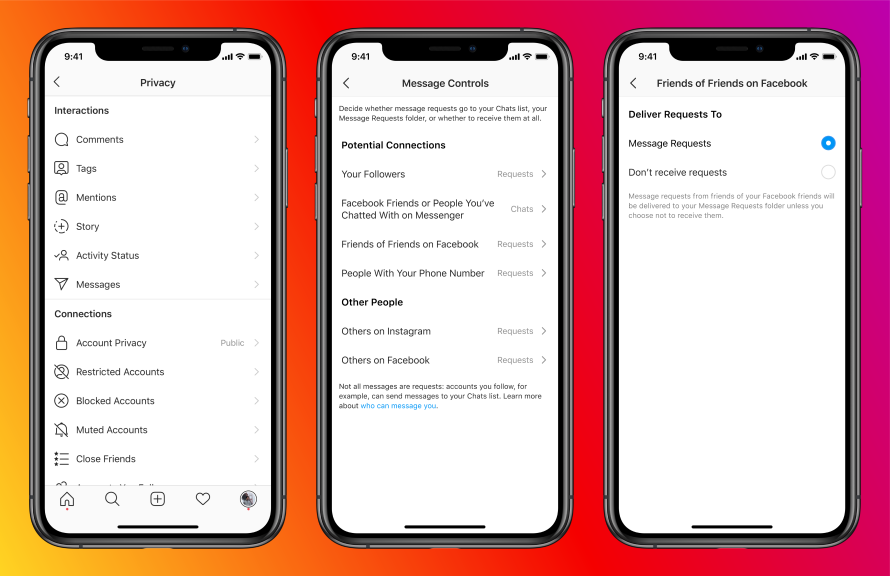
Bringing Messenger to Instagram means you’ll get all the customization features from the original Messenger for Instagram chats too. Facebook has also added vanish mode, selfie stickers, animated messaging effects, and other features to the new service.

Facebook Messenger on Instagram: How it work?

Facebook messenger on Instagram brings new controls and features

You use your Facebook account to log into Instagram. Facebook is simply bridging your Messenger and Instagram DMs. This means you can now reply to messages and join video calls using any of the two apps. Also, it’ll definitely save time in finding that one chat which is always lost because we can’t remember where it was.

The company has also added some new features that’ll roll out for both Instagram and Messenger. Here’s what you’ll get with Facebook Messenger on Instagram —

Vanish Mode and Message Controls

Facebook is adding vanish mode and message controls to the new platform. If you’re chatting in vanish mode, the messages automatically get deleted once they’re seen or you’ve closed the chat. Message controls let you decide who can message you.

You can also choose where to receive your message and call requests, or to not receive them at all.

Co-watching, Selfie Stickers, And More

Group watching has become particularly popular since COVID-19 locked down people in their homes. The new “Watch Together” feature will let you co-watch videos on IGTV, Reels, Facebook Watch, TV shows and movies, while having a video call. The feature will be added later.

Facebook Messenger on Instagram also gets a selfie sticker feature. This will let you take a boomerang selfie, add filters and animations to it and use it as stickers in a chat. You can also customize chat colors and add custom emoji shortcuts now.

Animated Message Effects have been added too. This means you can send messages with iMessage-ish animations and custom effects. You can also forward a message to up to 5 people or groups at once. Just like WhatsApp, Facebook Messenger will now let you reply to specific messages.

Facebook Super Sync

We like to call the integration of Facebook-owned apps as ‘Super Sync.’ It basically applies to the levels of synchronization that Facebook can achieve by integrating all its products and services.

Facebook owns Instagram, WhatsApp, Messenger, and well, Facebook. It means two heavyweight social media platforms and two widely used messaging services. It’s a matter of time before Facebook synchronizes all these services and makes it super convenient.

Facebook recently started testing an Accounts Center to manage your Facebook, Instagram, and Messenger accounts. Imagine switching between Instagram DMs, Facebook messages, and WhatsApp conversations with the tap of a button. We’re almost there with Facebook Messenger on Instagram.

The post Facebook Messenger on Instagram Is The New Addition to “Super Sync” appeared first on Fossbytes.


from Fossbytes https://ift.tt/2SfFME4
via IFTTT

Tesla Bags A Huge Pre-Order Of 130 Semi Electric Trucks From Walmart

Recently Tesla received an order of 130 Semi electric trucks from Walmart Canada. Before this, Walmart had already placed an order for around 15 semi-trucks in 2017, when it was first unveiled. The company has significantly increased the number of orders, even without receiving a single Semi truck.

This massive order of electric trucks is aligned with Walmart’s global vision. In a recent announcement at Climate Week earlier this month, Walmart Canada said its goal is to target zero-emission by 2040.

Additionally, Walmart has declared a budget of $3.5 billion to achieve growth in company’s business along with following its goal of reducing carbon footprints.

Now before we move ahead let’s tell you a bit about Tesla Semi.

Also read: Can Tesla Semi Replace Conventional Diesel Trucks?

Tesla Semi Electric Truck

Back in 2017, Elon Musk introduced the Tesla Semi electric truck. As per the official website of Tesla, Semi will be available in two configurations. Customers will have the option to choose between a 300-mile and 500-mile range.

According to sources, Walmart Canada has ordered a top-end Semi with 500 miles of range. The reservation price of Tesla Semi is $20,000, which means Walmart has already paid $2,600,000 ($2.6 million). Tesla says the base price of a 500 mile Tesla Semi would be around $180,000. According to this price, the net worth of this order would be over $23 million.

This is one of the largest orders of Tesla Semi placed by any company so far.

Anyway, if we talk more about Tesla Semi, then its key highlights include the following:

  • Tesla Semi can sprint from 0 to 60 mph in 20 seconds while carrying 80,000 lbs weight.
  • The powertrain includes 4 independent motors on the rear axles.
  • Similar to the electric cars of Tesla, Semi will be incorporated with its advanced Autopilot system.
  • Tesla Semi consumes less than 2 kWh energy per mile.

Apart from this, what’s more awaited is the date when Tesla Semi will hit the roads. Initially, the electric truck was supposed to go into production in 2020. However, due to the COVID-19 crisis, the timelines got pushed. Now it seems the Semi is more likely to enter the market somewhere in 2021.

The post Tesla Bags A Huge Pre-Order Of 130 Semi Electric Trucks From Walmart appeared first on Fossbytes.


from Fossbytes https://ift.tt/2HLcyei
via IFTTT

Playing Grand Theft Auto Inside A Neural Network’s Hallucination? It’s Possible!

Ever imagined what a Neural Network's hallucination would look like? The post Playing Grand Theft Auto Inside A Neural Network’s Halluc...